
EVENT PLANNING SOFTWARE FOR EVENT PROS
Effortless event planning starts here.
Timelines, vendors, budgets, guest lists, proposals and invoices—organized in one platform built just for planners.
One platform, not twelve tabs
Replace all that software with one platform
The PDFs, spreadsheets, docs, forms and one-off planning apps you juggle for every event — all replaced by a single place built for planners.








- Leads & CRM
- Proposals
- Contracts
- Invoices
- Questionnaires
- Timelines
- Floor plans & layouts
- Moodboards
- Checklists
- Notes
- Guest lists
- Vendor management
- Budgets
- Templates
Event timelines
The day-of timeline, drag and drop.
Share it the way each person needs it — a clean PDF, or a live link that updates itself as you tweak, so you're never re-sending. Filter the timeline so each vendor sees only their part, and invite clients and vendors to collaborate across as many versions as the event calls for.
Share a live link or a PDF
Export any timeline as a PDF, or share it as a live link. Tweak the run of show and the link updates itself — so you're not re-sending a new file every time something moves.
A custom version per vendor
Filter the timeline to each vendor and export their own version — the caterer sees catering, the band sees the band. No one wades through the parts that aren't theirs.
Invite, collaborate, version freely
Invite clients and vendors to view and collaborate on the timeline — and create as many versions as you want, for different days, parties or what-ifs.
Sales features
From lead to booked to paid, without leaving the file.
The inquiry that lands on your site becomes the questionnaire, the proposal, the contract and the invoice — all attached to the same couple. Start from an event template so the fifteenth wedding doesn't get built like the first.
-
Lead inquiry form
Put a form on your site. Inquiries arrive as real leads, not another email to triage.
-
Questionnaire
Ask the discovery questions once, in writing. Answers land on the couple's record.
-
Proposal
Send the scope and the price from the same place the work will live.
-
Contract
Signed and stored against the event, not in a folder you'll search for in June.
-
Invoice & paid
Send invoices, auto-remind clients, take payment. Deposits and balances tracked per event.
All-in-one event management
Everything a planner needs, in one place.
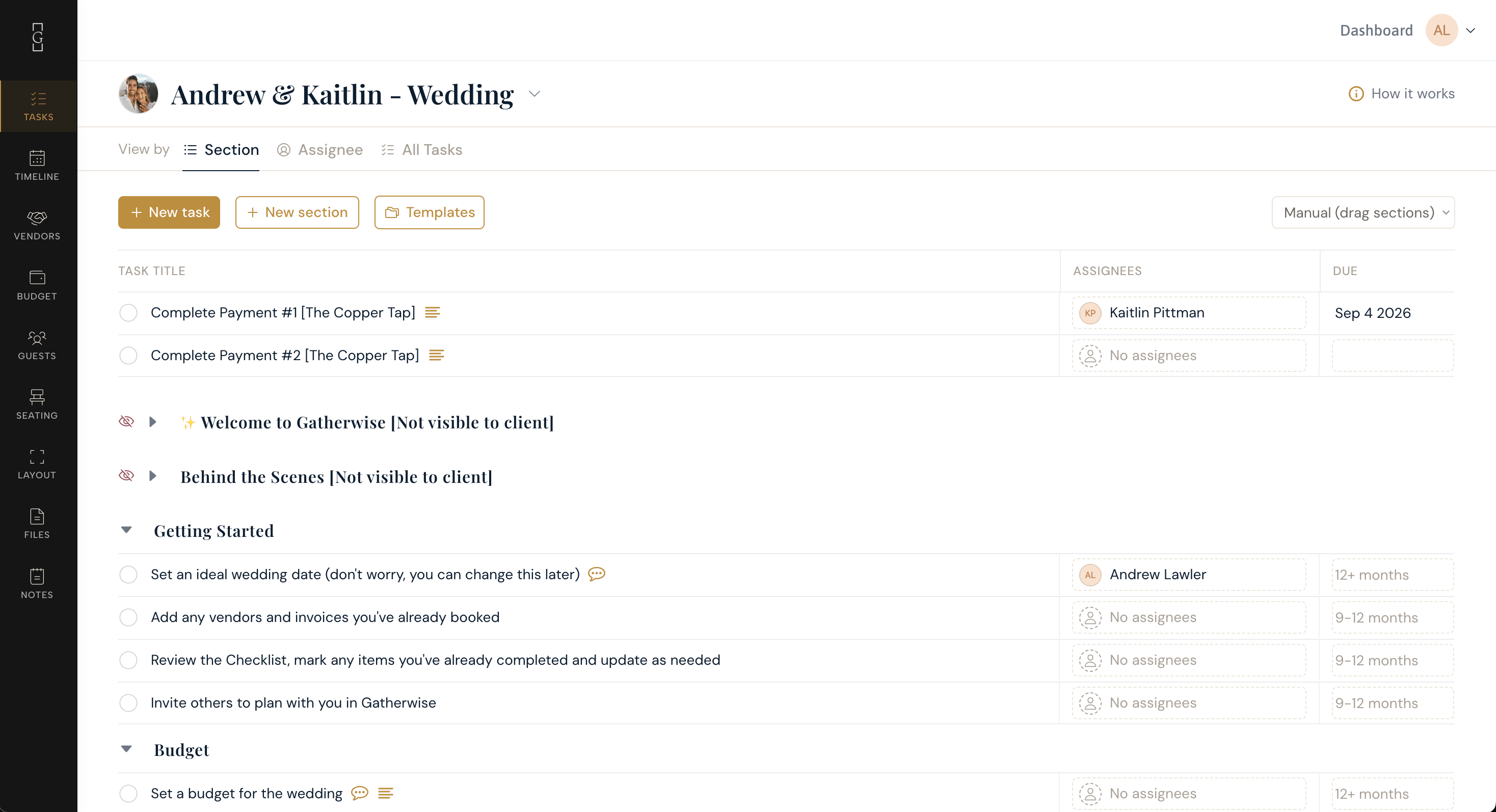
Client checklists
Tasks your couples actually keep up with.
Assign tasks, set due dates, and @mention the couple or a teammate — with comments and attachments right in the thread, so nothing ends up in a separate inbox.
Vendor management
Every vendor — considered, booked and paid.
Track vendors by category and booking status, with linked budgets, notes, files and payment progress against each event — not scattered across your inbox.
Budgets
Budget vs. actual, paid vs. still due.
The whole picture by category, per event — what you planned, what's actually been spent, what's paid and what's still outstanding.
Also in every event
Guest management
Guest lists, RSVPs and meal choices that feed straight into seating.
Client portal
Couples sign in with a magic link to follow timelines, layouts and tasks — and collaborate there.
Event templates
Reuse your run of show, tasks and checklists on the next booking.
Seating charts
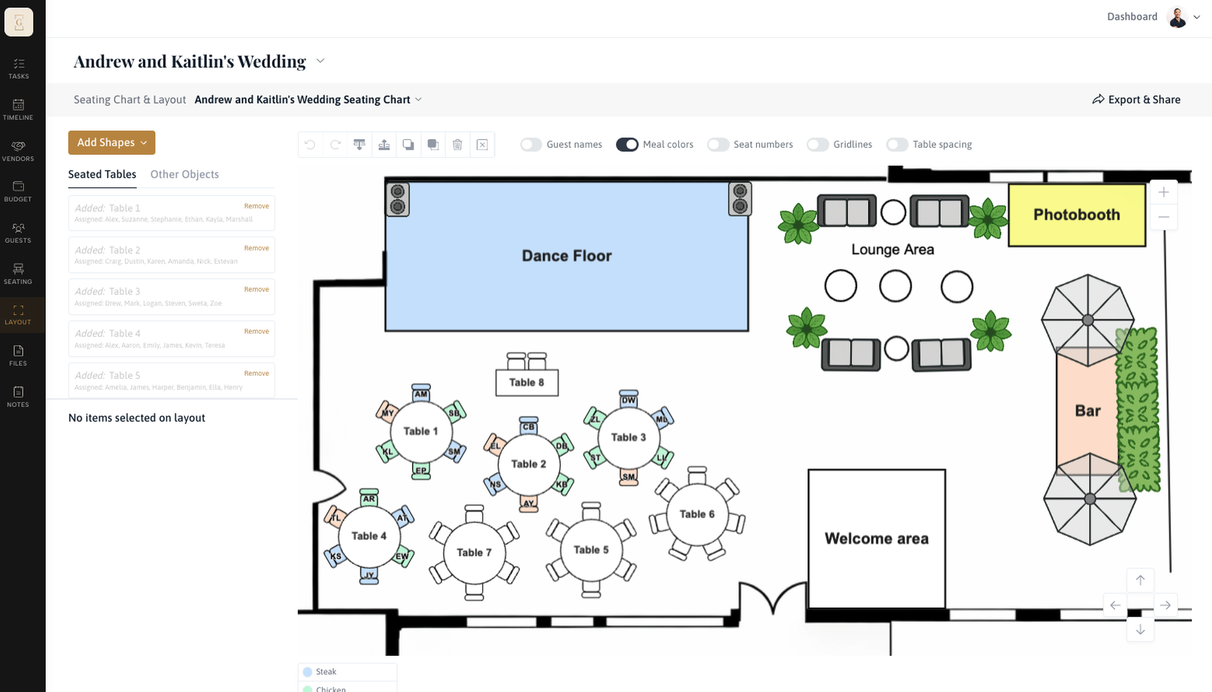
Seating charts and floor plans worth sharing.
Lay out tables against the real room, seat the guest list you already have, and send vendors and clients a clean, modern layout in one click — not a photo of a sketch.
- Tables and floor plans drawn to the room
- Seats pulled from your guest list and meal choices
- Share with vendors and clients in one click
Not a generic CRM
Built for the way planners actually work.
Generic client-management tools are good at pipelines and bad at events. They have no seating, no floor plans, no guest lists, no day-of timeline — so that half of the job ends up back in spreadsheets and documents.
| What running an event actually takes | Gatherwise | A generic CRM |
|---|---|---|
| Drag-and-drop day-of timelines, exported per vendor | — | |
| Seating charts and floor plans drawn to the room | — | |
| Guest lists, RSVPs and meal choices | — | |
| Budgets, invoices and payments per event | —Spreadsheet | |
| A client portal your couples actually use | —Emailed files | |
| Leads, proposals, contracts and a pipeline |
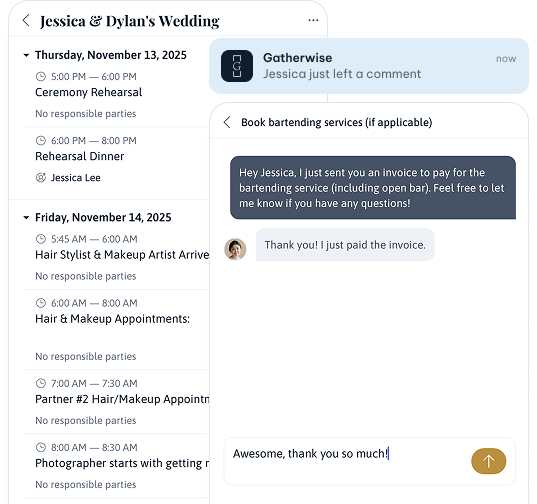
Mobile app
On the day, it's in your hand.
Real-time notifications, client messages, and the timeline, guest list and vendor contacts with you on the floor.

From planners

“Our clients love having everything for their event in one place. What sets Gatherwise apart is the team — they listen to feedback and turn it into updates we can see.”
 Shelby Martin
Co-Owner & Lead Planner, Martin & Co

“Having both our event-planning system and website created through Gatherwise has helped everything feel more cohesive and aligned with the elevated experience we want to provide.”
 Candace Kelly
Owner & Lead Planner/Designer, Overjoyed Weddings & Events

“An absolute game changer as a solo planner managing multiple couples. Budgets, tasks and vendors finally link together — and the drag-and-drop timeline is the standout.”
 Paige Farkas
Owner & Lead Planner, Farkas Events
Pricing
Simple, transparent pricing.
Choose the best plan for your team. Pay by the month and cancel at any time.
Every plan includes the full feature set. The tiers change how much you can run at once — and Elite adds per-tab permissions for clients and team members.
For a solo planner with a full but finite season.
- 15 active projects
- Client lead inquiry form
- Unlimited clients
- 1 questionnaire
- 1 admin + 1 team member
- Shared access for clients and team
- Timeline creation
- Task checklists
- Vendor management
- Client invoicing
- Payment processing
- Event templates
- Guest management
- Seating and layout
For a small studio running several couples at once.
- 40 active projects
- Client lead inquiry form
- Unlimited clients
- 3 questionnaires
- 2 admins + 2 team members Need more seats? Additional seats are ~$10/mo each.
- Shared access for clients and team
- Timeline creation
- Task checklists
- Vendor management
- Client invoicing
- Payment processing
- Event templates
- Guest management
- Seating and layout
For a team with no ceiling on the season.
- Unlimited projects
- Client lead inquiry form
- Unlimited clients
- Unlimited questionnaires
- 2 admins + 2 team members Need more seats? Additional seats are ~$10/mo each.
- View-only or edit access, per tab
- Timeline creation
- Task checklists
- Vendor management
- Client invoicing
- Payment processing
- Event templates
- Guest management
- Seating and layout
For larger firms that need it built around them — everything in Elite, plus custom features and workflows and dedicated support and onboarding. Reach out and we'll put together a quote.
Questions
Before you start.
Is this only for wedding planners?
It's built for event and wedding planners. Weddings are a core use case — which is why it has day-of timelines, seating and floor plans, and guest lists rather than a generic pipeline — but the same tools fit corporate events, galas, showers and social events just as well. Most wedding planners run those too, and it's one place for all of them.
How does the 14-day free trial work?
Fourteen days on Professional. Build a real event in it — that's the only way to know. There's no free tier after the trial, so if it isn't earning its keep you simply don't continue.
What counts toward my project limit?
Only active events. Once an event is over you archive it — it stops counting toward your limit but stays fully intact, so last season's timelines, layouts and invoices are still there to look up or copy from. In practice the limit is how many events you're running at once, not how many you've ever run.
Can I import my existing clients and vendors?
Bring your list and we'll help you get it in during the trial — send it over in whatever shape it's currently in. If you'd rather not hand it off, most solo planners add clients as each event starts and are current within a week.
Do my clients need an account to view timelines and layouts?
Your couples get their own client portal — but there's no password to set up or remember. You send them a secure magic link, they tap it, and they're in. It's the same idea as the "email me a login link" button you've used on other sites: one tap, no password to forget. Inside, they can follow timelines and layouts, comment on tasks, and share files. And if you only need someone to see a timeline or layout — a vendor or a venue contact — you can export and send it, with no login at all.
Is there a mobile app?
Yes. On iPhone, download it on the App Store — real-time notifications, client messages, and your event information with you on the floor. It's the day-of companion to the full app, not a replacement for it. There's an Android version too — email support@gatherwise.io and we'll get you set up.
What happens in my slow season — can I change plans?
Move up or down between plans as your load changes, and cancel any month. Billing is a flat monthly rate, so a heavy May doesn't cost more than a quiet January — and your past events stay where you left them.
Trusted by Planners across the U.S. and Canada
Join planners across the U.S. and Canada who trust Gatherwise to impress clients, stay organized, and save hours.
14-day free trial · Cancel anytime